Download Blockbuster Inc. for FREE on PC. Learn how to download and install Blockbuster Inc. for free in this article and be sure to share this site with your friends.
Game Overview
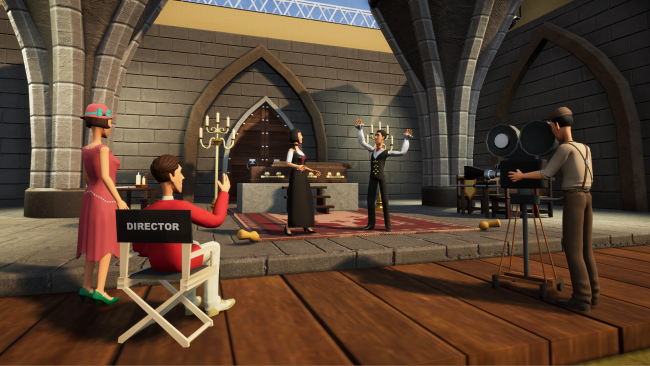
Welcome to Blockbuster Inc., the next-generation simulation game where you take the reins of your movie studio and pave your way to the cinematic hall of fame. Create groundbreaking films, nurture the next generation of acting talents, and usher in a new era in the movie industry.
Create your own sets, design your movies, choose actors, and pick their costumes, decide on camera movement and the behaviour of the actors, and that is not the end! After shooting the movie you can decide upon the sound design, layout of scenes and sfx!
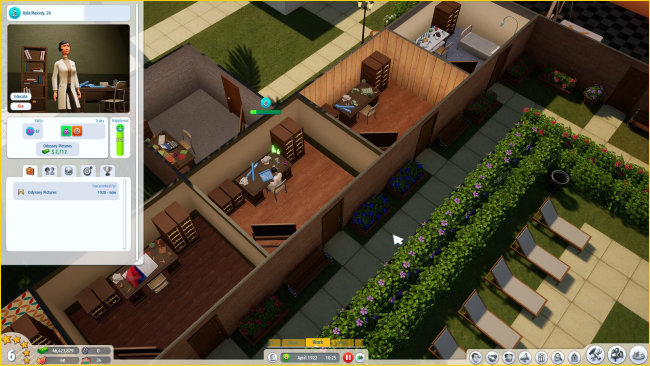
Build it, decorate it, manage it! In Blockbuster Inc you choose how your studio looks, from wallpapers to the size of the rooms. You can choose working hours, buy shares from other studios, take loans, decide on the marketing and so much more! There is no end to good management!
Talent scouting is an art, and you are the artist. Unearth hidden gems among aspiring actors and turn them into the industry’s brightest stars. But remember, each star comes with unique traits and demands. Handling the temperaments of divas and smooth operators alike will test your managerial sharpness.
Will you dominate the red carpet, winning accolades and securing your place in cinematic history? Manage your studio’s reputation, make strategic decisions, and bask in the glory of your award-winning success.

How to Download & Install Blockbuster Inc.
1. Click the Download button below and you will be redirected to crolinks. Wait 5 seconds to generate the link and then proceed to UploadHaven.
2. Once you are on the UploadHaven page, wait 15 seconds, then click on the grey ‘free download’ button to start the download.
3. Once Blockbuster Inc. is done downloading, right click the .zip file and click on “Extract to Blockbuster Inc.” (To do this you must have WinRAR installed.)
4. Double click inside the Blockbuster Inc. folder and run the exe application as administrator.
5. Have fun and play! Make sure to run the game as administrator and if you get any missing dll errors, be sure to install everything located inside the _Redist or CommonRedist folder!
Blockbuster Inc. (v1.8.0d)
Size: 4.38 GB
Download speeds slow? Use Free Download Manager for faster speeds.
If you need any additional help, refer to our Troubleshoot section
YOU MUST HAVE DIRECTX INSTALLED TO AVOID DLL ERRORS.
IF YOU STILL HAVE DLL ERRORS, DOWNLOAD AND INSTALL THE ALL-IN-ONE VCREDIST PACKAGE
NOTICE: MAKE SURE TO HAVE YOUR ANTIVIRUS DISABLED, NOT DOING SO RESULTS INTO THE GAME YOU ARE INSTALLING TO CRASH AND NOT OPEN. ALL DOWNLOAD FILES ON THIS SITE ARE 100% CLEAN, REGARDLESS OF WHAT NORTON, AVG, MCAFEE, ETC… PICKS UP
System Requirements
- Requires a 64-bit processor and operating system
- OS *: Windows 7+
- Processor: 3 GHz Dual Core Processor
- Memory: 6 GB RAM
- Graphics: GTX 660 / R7 370 – 3 GB Video Memory
- Network: Broadband Internet connection
- Storage: 5 GB available space
Screenshots