Download Peggle Extreme for FREE on PC. Learn how to download and install Peggle Extreme for free in this article and be sure to share this site with your friends.
Game Overview
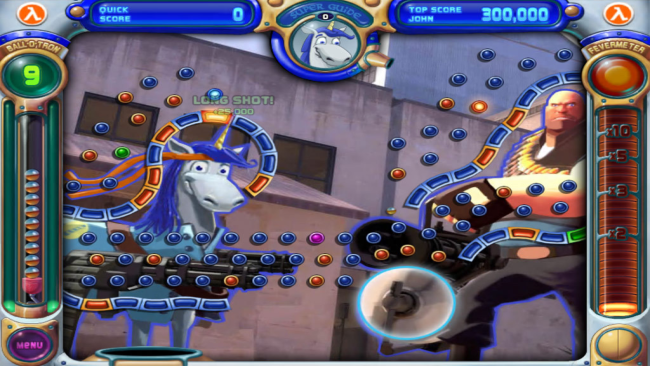
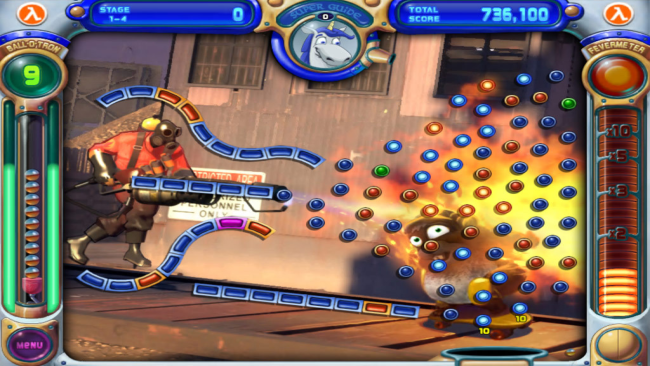
Mayday! The Peggle Institute has been invaded by a host of other-worldly creatures. It’s up to you, Peggle Master, to report to duty and shoot and bounce the critters to oblivion. Take your best shot with energizing arcade fun, now exclusively themed with art and sounds from The Orange Box! Peggle Extreme delivers fast-paced puzzle action that combines elements of pinball and pachinko to create a truly unique game experience. As with the original Peggle, Peggle Extreme requires players to fire a metallic silver ball from the top of the screen, relying on gravity to propel the ball downwards while ricocheting off orange and blue “pegs”. The goal is to clear all the orange pegs from the screen before running out of balls. A moving “bucket” at the bottom of the screen offers free balls, while green power-up and purple “bonus multiplier” pegs provide additional twists. Peggle Extreme features one power-up in the form of Bjorn the Unicorn, whose special takes the form of a “super-guide” sighting capability which enables players to see where there next shot will go beyond one or two initial bounces.
- Master 10 levels of “Extreme” challenges
- Conquer 5 Master challenges
- Play against a friend or the computer in Duel Mode
- Revel in breathtaking artwork and sounds from Half-Life: Episode 2, Portal, and Team Fortress 2
- Replay and save your best shots

How to Download & Install Peggle Extreme
1. Click the Download button below and you will be redirected to crolinks. Wait 5 seconds to generate the link and then proceed to UploadHaven.
2. Once you are on the UploadHaven page, wait 15 seconds, then click on the grey ‘free download’ button to start the download.
3. Once Peggle Extreme is done downloading, right click the .zip file and click on “Extract to Peggle Extreme” (To do this you must have WinRAR installed.)
4. Double click inside the Peggle Extreme folder and run the exe application as administrator.
5. Have fun and play! Make sure to run the game as administrator and if you get any missing dll errors, be sure to install everything located inside the _Redist or CommonRedist folder!
Download speeds slow? Use Free Download Manager for faster speeds.
If you need any additional help, refer to our Troubleshoot section
YOU MUST HAVE DIRECTX INSTALLED TO AVOID DLL ERRORS.
IF YOU STILL HAVE DLL ERRORS, DOWNLOAD AND INSTALL THE ALL-IN-ONE VCREDIST PACKAGE
NOTICE: MAKE SURE TO HAVE YOUR ANTIVIRUS DISABLED, NOT DOING SO RESULTS INTO THE GAME YOU ARE INSTALLING TO CRASH AND NOT OPEN. ALL DOWNLOAD FILES ON THIS SITE ARE 100% CLEAN, REGARDLESS OF WHAT NORTON, AVG, MCAFEE, ETC… PICKS UP
System Requirements
Minimum Requirements:
- Windows 2000/XP/Vista, 256 MB RAM, 700MHz or faster, DirectX: 7.0
Screenshots