Download WAR Card Game_uvr for FREE on PC. Learn how to download and install WAR Card Game_uvr for free in this article and be sure to share this site with your friends.
Game Overview
FEATURES:
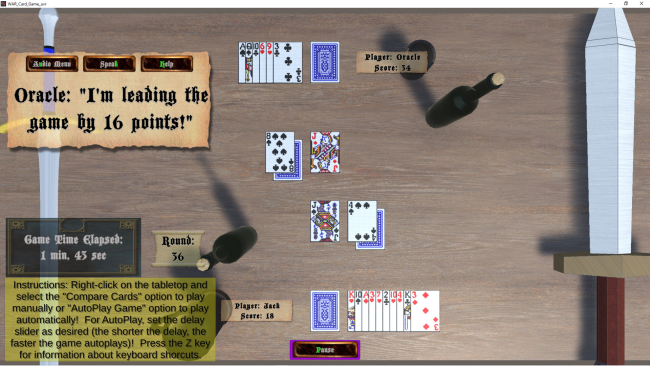
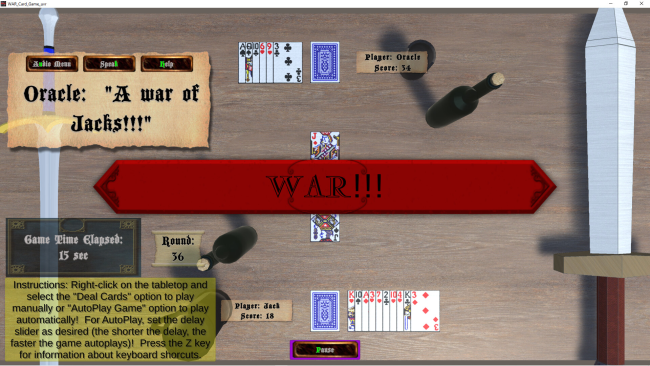
- GAME DURATION, ROUNDS AND LEAD TRACKING: The game tracks how long you play, the number of rounds played and who is in the lead and by how many points. The Oracle tells you who’s in the lead and by how much both by speaking to you and printing text on the screen.
- AUTO-PLAY: The game has an auto-play feature that allows you to have the computer play out the game automatically either to the end of the game or until a WAR occurs. You can choose how rapidly the game is auto-played by setting the auto-play delay. The shorter the delay, the faster the game auto-plays. The auto-play delay slider decreases the delay when you slide it to the left and increases the delay when you slide it to the right. By default, the delay is set in the middle.
- PAUSE: You can pause the game. The Pause Button is located at the bottom of the screen only while a game is playing.
- SAVE AND LOAD GAME: You can save the game to finish playing another time. The saved game can be loaded by clicking the Load Game Button on the Start Menu Panel. There is a tool tip when you hover the mouse pointer over the Load Game or Save Game Button that tells you the date and time of when the game was saved.
- PLAYER NAME SAVE: The game saves your name so you don’t have to type it in every time. Your name can only be ten characters long.
- CARD CONFIGURATION SAVE: The game also saves the configuration of the cards at the end of a game so the cards are more thoroughly shuffled the next time you play.
- CARD SHUFFLING: To shorten the game and prevent the cards from just going back and forth between the players endlessly, the cards are shuffled not only at the beginning of the game but also when the cards each player has won are transferred to the cards each player is dealing from. You can hear when the cards are being shuffled.
- ORACLE VOICE GENDER SELECTION: Also, you can choose the gender of the Oracle’s voice in the Audio Menu.
How to Download & Install WAR Card Game_uvr
1. Click the Download button below and you will be redirected to crolinks. Wait 5 seconds to generate the link and then proceed to UploadHaven.
2. Once you are on the UploadHaven page, wait 15 seconds, then click on the grey ‘free download’ button to start the download.
3. Once WAR Card Game_uvr is done downloading, right click the .zip file and click on “Extract to WAR Card Game_uvr” (To do this you must have WinRAR installed.)
4. Double click inside the WAR Card Game_uvr folder and run the exe application as administrator.
5. Have fun and play! Make sure to run the game as administrator and if you get any missing dll errors, be sure to install everything located inside the _Redist or CommonRedist folder!
WAR Card Game_uvr
Size: 156.40 MB
Download speeds slow? Use Free Download Manager for faster speeds.
If you need any additional help, refer to our Troubleshoot section
YOU MUST HAVE DIRECTX INSTALLED TO AVOID DLL ERRORS.
IF YOU STILL HAVE DLL ERRORS, DOWNLOAD AND INSTALL THE ALL-IN-ONE VCREDIST PACKAGE
NOTICE: MAKE SURE TO HAVE YOUR ANTIVIRUS DISABLED, NOT DOING SO RESULTS INTO THE GAME YOU ARE INSTALLING TO CRASH AND NOT OPEN. ALL DOWNLOAD FILES ON THIS SITE ARE 100% CLEAN, REGARDLESS OF WHAT NORTON, AVG, MCAFEE, ETC… PICKS UP
System Requirements
- OS: Windows 10 or higher
- Processor: Intel(R) Core(TM) i7-3630QM CPU @ 2.40GHz or better
- Memory: 8 GB RAM
- Graphics: AMD Radeon™ HD 7670M Graphics 1GB DDR3 or better
- DirectX: Version 11
- Storage: 300 MB available space
Screenshots